

GIMP vs Photoshop in 2026: Is the Free Editor Finally Good Enough?
GIMP vs Photoshop: For years, GIMP had a reputation problem. It was free, powerful in theory, but clunky enough that most people gave up and went back to paying for Photoshop. That reputation is starting to shift. With the release of GIMP 3.2 in early 2026, the open-source editor picked up features that were previously exclusive to paid software, closing a gap that’s existed for over a decade.
So is GIMP actually a serious Photoshop alternative now, or still just a budget workaround? This guide walks through the real differences in features, performance, and usability so you can decide whether GIMP fits your workflow, or whether Photoshop’s subscription is still worth paying for. Lets read more GIMP vs Photoshop.
GIMP vs Photoshop:
GIMP 3.2, released in March 2026, introduced non-destructive Link Layers, letting users incorporate external images into a composition and scale or transform them without losing quality. It also added Vector Layers through the Path tool, giving users shape-based editing with adjustable fill and stroke settings — something that used to be a clear Photoshop advantage.
This builds on GIMP 3.0’s earlier shift to non-destructive layer effects and native CMYK color handling, both long-requested features that finally brought GIMP closer to a professional workflow rather than a hobbyist tool.
Photoshop, meanwhile, continues to push forward with AI-driven tools like Generative Fill, keeping a clear lead in that specific category.
Pricing: Free Software vs Subscription Software:
GIMP Costs Nothing:
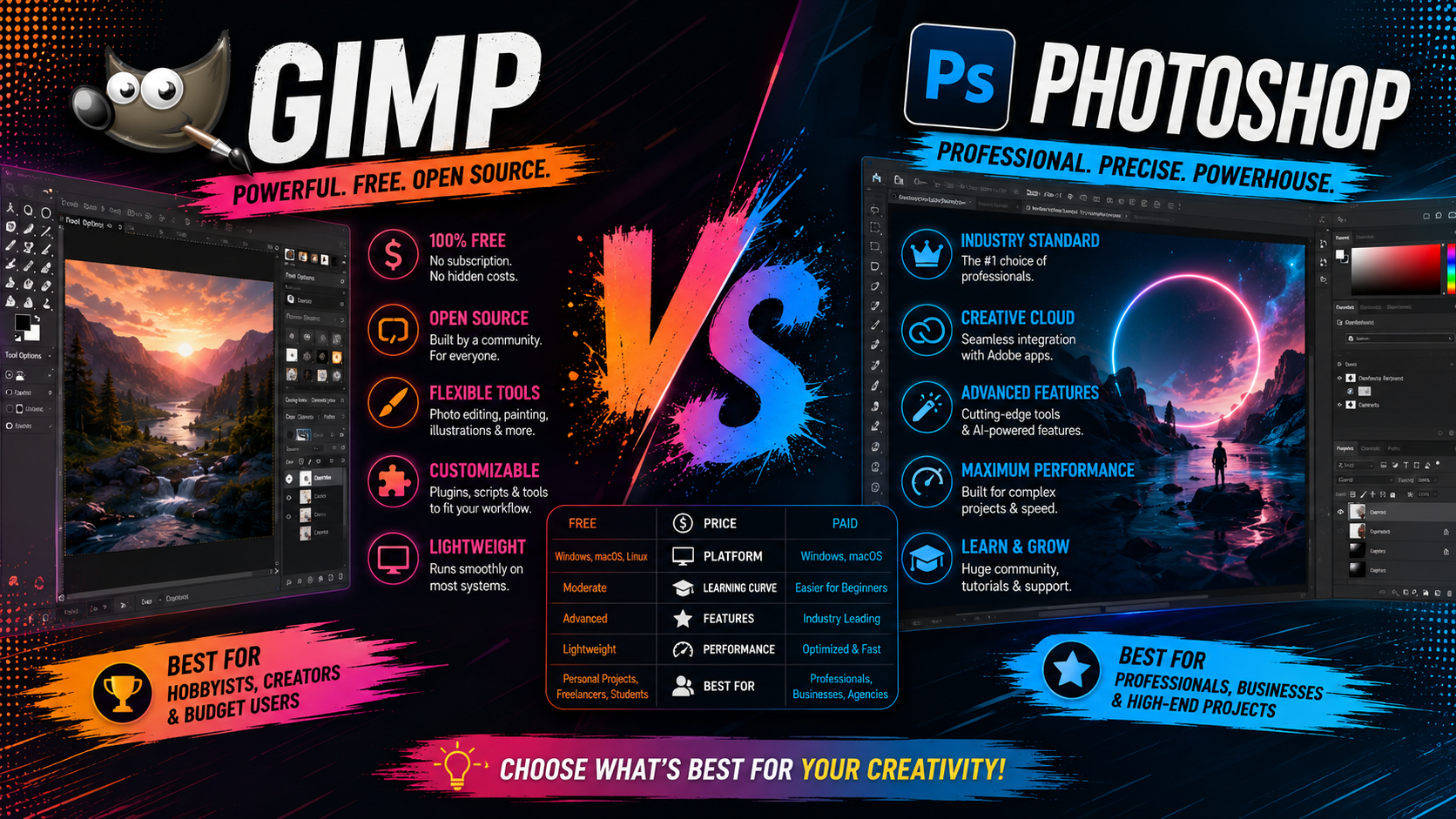
GIMP is completely free and open-source, with no ads, no watermarks, and no feature restrictions based on payment. You can use every tool the software offers without ever entering a credit card.
Photoshop Requires an Ongoing Subscription
Photoshop has no one-time purchase option. The standalone plan runs around $22.99 per month, the Photography plan (with Lightroom included) costs about $19.99 per month, and the full Creative Cloud Pro suite runs closer to $69.99 per month for access to the complete Adobe app lineup and AI tools.
For anyone editing images occasionally, GIMP’s zero cost is hard to argue with. For professionals relying on advanced AI features, Photoshop’s price becomes easier to justify.
Feature Comparison: Where GIMP Holds Its Own:
Layers and Non-Destructive Editing:
With GIMP 3.0 and 3.2, non-destructive layer effects and Link Layers now let users apply and adjust filters without permanently altering pixel data, a workflow Photoshop users have relied on for years. This was one of the most persistent gaps between the two tools, and it’s now meaningfully closed.
Color Management:
GIMP’s native CMYK support, added through the babl pixel-encoding library, addresses a long-standing weak point for print-focused designers who previously needed Photoshop for accurate color handling.
Plugin and Script Support:
GIMP supports extensions written in Python, JavaScript, Lua, and Vala, giving developers real flexibility to expand its functionality. Popular third-party plugins, like G’MIC-Qt, bring hundreds of additional filters and effects into GIMP’s toolkit.
File Format Compatibility:
GIMP has improved PSD export and import handling, though very complex Photoshop files with smart objects or advanced effects may still not translate perfectly between the two programs.
Where Photoshop Still Leads:
Generative AI Tools:
Photoshop’s Generative Fill and Neural Filters remain unmatched. GIMP has no built-in equivalent, so tasks like removing objects or extending backgrounds with AI still require manual work in GIMP.
Interface Polish and Learning Resources:
Photoshop benefits from a more refined interface, extensive official documentation, and a massive library of tutorials built up over decades. GIMP’s interface has improved significantly with the GTK3 migration, but it still asks more of new users upfront.
Industry Standard Status:
Photoshop remains the default expectation in most professional creative studios, meaning file handoffs, plugin ecosystems, and industry workflows are often built around it first.
Performance and Usability in 2026:
GIMP’s move to GTK3 in version 3.0 brought better HiDPI screen scaling, improved tablet input support, and native Wayland support on Linux, addressing complaints that had lingered for years. Combined with GIMP 3.2’s performance improvements, the software now feels noticeably more modern than it did just two years ago.
Photoshop still holds an edge in raw stability with very large, layer-heavy files, particularly for studios working with high-volume production pipelines.
Who Should Use GIMP vs Photoshop?
Hobbyists and students: GIMP now offers enough professional-grade features to learn real editing skills without any cost.
Print designers needing CMYK: GIMP’s native color management finally makes it a viable option for print-focused work.
Photographers relying on AI retouching: Photoshop’s Generative Fill and Neural Filters still make a real difference in workflow speed.
Studios with established Adobe workflows: Photoshop remains the safer choice for compatibility with existing plugins and team pipelines.
Frequently Asked Questions:
Is GIMP as good as Photoshop in 2026? GIMP has closed much of the gap with non-destructive editing, CMYK support, and improved performance in versions 3.0 and 3.2, though Photoshop still leads in AI tools and industry-standard workflows.
Is GIMP completely free to use? Yes. GIMP is free and open-source with no feature restrictions, ads, or watermarks on exports.
Can GIMP open Photoshop PSD files? Yes, GIMP supports PSD import and export, though very complex files with smart objects or advanced effects may not translate perfectly.
Does GIMP have AI tools like Photoshop’s Generative Fill? No. GIMP doesn’t currently offer a built-in generative AI toolset comparable to Photoshop’s Generative Fill or Neural Filters.
What’s new in GIMP 3.2 compared to Photoshop? GIMP 3.2 added non-destructive Link Layers and Vector Layers, narrowing the gap with Photoshop’s long-standing non-destructive editing capabilities.
Final Thoughts:
GIMP in 2026 is a genuinely different tool than it was even a couple of years ago. With non-destructive editing, native CMYK support, and a more modern interface, it’s closed much of the distance that used to make Photoshop the obvious choice. Photoshop still holds the edge on AI tools and industry standardization, but for most everyday and even professional print work, GIMP now holds up as a legitimate, cost-free alternative.
If you’ve dismissed GIMP before, it’s worth downloading version 3.2 and giving it another look. If your work depends heavily on AI-assisted retouching, Photoshop’s subscription still earns its keep.
Also read our article: Canva Vs Photoshop
Leave a Reply