


When you open Google Gemini and type in a vague description like “a cat,” you get generic results. But when you craft a detailed Gemini AI photo prompt, something magical happens—you get images that actually match your vision.
The difference between mediocre and stunning AI-generated photos comes down to one skill: knowing how to prompt effectively. Whether you’re a marketer creating social media content, a designer exploring new ideas, or someone who simply wants beautiful images, mastering Gemini AI photo prompts will transform your creative process.
This guide walks you through everything you need to know—from foundational techniques to advanced strategies that’ll make your prompts work harder and smarter. By the end, you’ll have a proven formula, real examples, and the confidence to generate exactly what you imagine.
What Are Gemini AI Photo Prompts and Why They Matter
Understanding the Basics
A Gemini AI photo prompt is the text instruction you give Google Gemini’s image generation model to create a visual. It’s the bridge between your imagination and AI-generated reality.
Unlike simple one-word requests, effective Gemini image prompts include specific details: style, mood, composition, color palette, and technical elements. This specificity is what separates amateur results from professional-quality images that you’d actually use.
Think of it this way: you wouldn’t tell a photographer “take a picture” without any direction. The same applies to AI. The more guidance you provide, the better the output.
Why Prompt Quality Determines Your Results
AI models like Gemini interpret language literally. If you say “a person,” it might generate a blurry figure with odd proportions. But if you specify “a professional woman in her 30s, wearing business attire, sitting in a modern office with natural lighting, photorealistic style,” you’ll get exactly what you envisioned.
The better your Gemini AI photo prompt, the fewer iterations you’ll need—saving time and getting consistent results. This is why prompt engineering has become a valuable skill in the AI era.
Essential Elements of a Powerful Gemini AI Photo Prompt
Subject and Context
Start by clearly defining what you want. Is it a person, object, landscape, or scene? Provide context about the setting and situation. This is the foundation of every strong prompt.
Example:
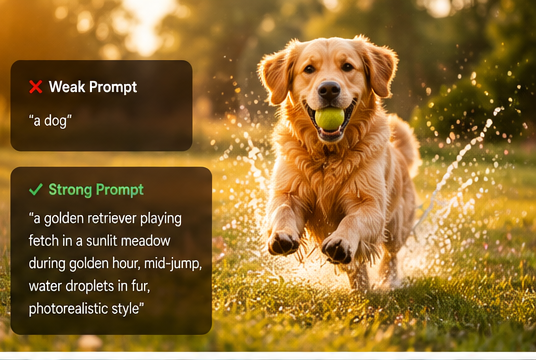
- ❌ Weak: “A dog”
- ✅ Strong: “A golden retriever playing fetch in a sunlit meadow during golden hour, mid-jump, water droplets in fur”
Style and Artistic Direction
Specify the visual style to align the image with your needs:
Photography styles:
- Photorealistic, documentary photography, macro photography, street photography
Art styles:
- Oil painting, watercolor, digital illustration, cyberpunk aesthetic, vintage film
Tone and mood:
- Moody, vibrant, minimalist, dramatic, cozy, luxurious
When you include style references, Gemini understands the exact visual direction you’re pursuing.
Composition and Framing
Tell Gemini how to frame the shot:
- “Close-up portrait with shallow depth of field”
- “Wide-angle landscape with expansive sky”
- “Overhead flat lay with centered subject”
- “Rule of thirds composition with subject on left third”
Composition guidance dramatically improves how professional the final image looks.
Lighting and Atmosphere
Lighting dramatically affects the mood and realism:
- “Golden hour backlighting with lens flare”
- “Soft diffused light from studio softbox”
- “High-contrast shadows creating dramatic effect”
- “Neon glow, cyberpunk atmosphere with dark background”
Specific lighting details transform ordinary images into stunning visuals.
Color Palette
Guide the color choices in your Gemini AI image prompt:
- “Warm earth tones: ochre, rust, cream, and sage”
- “Cool blues and purples with silver accents”
- “High saturation, vibrant colors with pop of red”
- “Monochromatic black and white with subtle grays”
Color precision prevents mismatched results.
Technical Quality Details
End with quality markers:
- “4K resolution, ultra-detailed, intricate details”
- “Shot on Canon 5D Mark IV with 85mm lens, f/1.4 aperture”
- “Award-winning photography, Getty Images quality”
- “Sharp focus, professional retouching”
These details signal to Gemini that you want premium-quality output.
Step-by-Step Guide to Writing Effective Gemini Photo Prompts
The Formula That Works
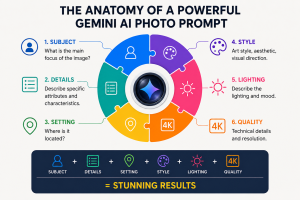
Here’s a proven structure for Gemini AI photo prompts that delivers consistent results:
[Subject] + [Specific Descriptive Details] + [Setting/Environment] + [Style/Artistic Direction] + [Lighting] + [Mood/Atmosphere] + [Technical Quality Parameters]
This formula gives Gemini all the context needed to generate exactly what you’re envisioning.
Real-World Gemini Prompt Examples
Example 1 – Professional Headshot: “Corporate headshot of a confident African American woman in her 40s, wearing a navy blazer over a white silk blouse, seated in a minimalist office with floor-to-ceiling windows showing a blurred city skyline, soft window lighting illuminating her face with subtle shadows, professional photography, warm skin tones, studio quality, sharp focus on eyes, hair pulled back in elegant style, 4K resolution, Getty Images quality”
Example 2 – Product Photography: “Minimalist product photo of a blue ceramic coffee mug on a white marble surface, morning sunlight streaming from the left side, casting soft shadows on the marble, high-end photography, shallow depth of field, warm coffee steam rising from the mug, Getty Images style, ultra-sharp, 85mm lens aesthetic, clean background, luxury product photography, 4K resolution”
Example 3 – Lifestyle Scene: “Young female freelancer working from a cozy Scandinavian café, MacBook Pro open, latte beside them, wooden table, floor-to-ceiling windows with blurred street view outside, golden hour light streaming through windows, candid documentary style, warm and inviting atmosphere, shallow depth of field, genuine moment captured, lifestyle photography, bright and airy aesthetic, natural colors, 4K quality”
Example 4 – Creative Scene: “Vintage leather suitcase stacked on top of another, both open, vintage maps and travel guides spilling out, wooden floor, warm lamp light creating golden glow, retro travel aesthetic, shallow depth of field, storytelling composition, nostalgic atmosphere, film photography look, color graded warm tones, Getty Images quality, 4K resolution”
Common Mistakes in Gemini AI Photo Prompts
Avoiding these pitfalls will immediately improve your results:
- Being too vague: “A nice photo” tells Gemini nothing. Details matter exponentially more than you’d think.
- Contradictory styles: “Photorealistic cartoon” confuses the AI. Combine compatible styles instead.
- Overloading with adjectives: “Gorgeous, beautiful, amazing, stunning” don’t help Gemini. Be specific instead: “bright, airy, luxurious, refined.”
- Ignoring technical parameters: Add resolution, lens type, or photography style for consistency.
- Unclear subject hierarchy: Gemini reads top-to-bottom. Put your main subject first, details after.
Advanced Techniques for Gemini Image Generation
Negative Prompting
Tell Gemini what NOT to include:
“A modern coffee shop interior, professional photography, warm lighting… avoid: blurry background, watermarks, low quality, cluttered, artificial harsh lighting, ugly hands, distorted faces”
Negative prompts prevent common AI generation mistakes.
Reference Style Prompting
Borrow established aesthetics from famous photographers and filmmakers:
- “In the style of National Geographic photography”
- “Shot by Annie Leibovitz, editorial fashion photography aesthetic”
- “Inspired by Blade Runner 2049 cinematography, neon lighting”
- “Architectural Digest cover quality”
- “Vogue magazine editorial style”
These references give Gemini a clear visual direction.
Iterative Refinement Process
Your first Gemini AI photo prompt won’t be perfect—that’s completely normal and part of the process. Generate an image, then adjust:
- Got the right mood but wrong colors? Specify new color palette in next prompt
- Love the composition but need different subject? Keep composition description, modify subject only
- Too realistic, need more artistic? Shift toward an artistic style
- Not enough detail? Add more specific descriptors in next iteration
Think of prompting as a conversation with the AI. Each iteration teaches you more about how Gemini interprets your language.
Gemini AI Photo Prompt for Different Professional Applications
Marketing and Social Media
Create on-brand visuals without expensive photoshoots. Use Gemini AI photo prompts to generate hero images, social media graphics, blog cover photos, and Instagram content consistently. Save thousands in photography costs while maintaining brand consistency.
E-Commerce and Product Photography
Generate lifestyle product images, alternative color variations, and use-case scenarios. A single Gemini image prompt can spawn an entire product photography series without reshoots.
Graphic Design and Branding
Explore design directions quickly. Test color schemes, visual styles, typography backgrounds, and brand aesthetics before investing in professional design work.
Creative and Artistic Projects
Use Gemini AI image prompts as brainstorming tools, mood boards, concept exploration, or starting points for personal creative projects. Generate multiple variations to find your preferred direction.
Troubleshooting Your Gemini AI Photo Prompts
Problem: “The AI keeps missing important details”
Solution: Add those details earlier in your prompt; Gemini weights earlier words more heavily. Restructure to put critical details first.
Problem: “Results look generic or AI-generated”
Solution: Add “photorealistic,” specific camera settings, famous photographer references, and professional photography credentials.
Problem: “Colors aren’t matching my vision”
Solution: Be hyper-specific about colors; use professional color names (sage green, burnt sienna) or reference color palettes instead of vague descriptors.
Problem: “Hands look weird or distorted”
Solution: Add “perfect hands” or “hands in pockets” to your negative prompt. Keep hands simple or out of frame if possible.
Problem: “Text or numbers appear corrupted”
Solution: Avoid requesting readable text in images. If you need signage, keep text simple or ask for blurred readable copy.
FAQ: Common Questions About Gemini AI Photo Prompt
Q: How long should a Gemini AI photo prompt be?
A: 75-150 words is optimal. Long enough for rich detail, short enough to avoid confusion. Gemini processes longer prompts well, but clarity matters more than length. Test different lengths to find your sweet spot.
Q: Can I use Gemini photo prompts for commercial projects?
A: Yes, but review Gemini’s terms of service for commercial use rights. Generated images are typically free to use commercially for most use cases, but always verify current policies before using them professionally.
Q: How many attempts does a good Gemini AI photo prompt usually need?
A: Most people refine prompts 2-4 times before getting their ideal image. Think of it as a conversation with the AI where you gradually dial in the perfect result.
Q: What’s the difference between Gemini’s image generation and other AI tools?
A: Gemini excels at understanding complex, detailed prompts with natural language. It’s particularly strong with composition, lighting details, and photorealistic styles. It also integrates seamlessly with other Google tools.
Q: Can I upload reference images for my Gemini photo prompts?
A: Gemini allows image inputs in conversations, which you can reference in follow-up text prompts. Its primary image generation works from text prompts, but you can use uploaded images as style references in your prompt instructions.
Conclusion: Start Mastering Gemini AI Photo Prompts Today
The difference between good and exceptional AI-generated images isn’t luck—it’s technique. By understanding how to construct detailed, specific Gemini AI photo prompts, you unlock professional-quality visuals on demand.
Start with the formula we covered: subject, descriptive details, setting, style, lighting, mood, and quality markers. Keep refining through iteration. Before long, you’ll be generating stunning images that match your exact vision every single time.
The future of visual content creation is here—and it starts with mastering the prompt. Every image you create teaches you something new about communicating with AI. Each refinement gets you closer to perfection.
Ready to transform your creative workflow? Open Gemini right now, grab one of the real examples from this guide, and experiment with your own prompts today. Start simple, then add complexity as you grow comfortable. Within a week of consistent practice, you’ll be generating images that rival professional photography.
Your competitive advantage in content creation starts with better prompts. Begin today.
Leave a Reply